
Sky Tax produces and controls your whole tax practice.
Prepare, review, submit and track ITR12 individual returns, ITR12T trust returns, ITR14 company returns, IRP6 provisional tax, VAT201, IT3(t) and IT3(d) work — with SARS information, documents, staff responsibilities and a permanent audit trail connected to the same client record.
Prepare, file and manage in one place
Sky Tax is more than a filing tool. Build the return from client and source data, with calculations and supporting evidence kept against the relevant transaction. Review and submit the return, then retrieve and compare the SARS assessment. If SARS raises a query, keep the correspondence, assign the follow-up work and manage it through to resolution on the same client record.
Built for South African accounting firms and tax practitioners.
- Unlimited authorised users
- Direct SARS submission and retrieval
- One shared client record
Backed by more than 30 years of Accfin practice-software experience.

Every major return. One Sky Tax workflow.
Sky Tax is Accfin’s complete tax-production platform for individuals, trusts and companies. The firm’s tax returns, SARS information, documents, staff responsibilities and client history are managed in one connected working environment.
Sky Tax handles the complete tax function. This campaign focuses on company returns.
Sky Tax supports the principal return types used by South African accounting firms and tax practitioners. We are currently highlighting ITR14 because many practices that already use Sky Tax still prepare company returns manually on SARS eFiling instead of using the trial-balance import, reusable mappings and connected company information available in Sky Tax.
Sky Tax does all the returns. We are now showing firms how much easier the ITR14 can be.
Stop capturing the ITR14. Start producing it.
Many firms still prepare company tax returns by manually capturing financial information into SARS eFiling. Sky Tax changes the process. Import the trial balance, apply or reuse the SARS source-code mapping, review the figures and submit the return through a structured production workflow.
- 01
Import
Import the trial balance from CSV or transfer the data from Draftworx.
- 02
Map
Apply an existing SARS source-code mapping or create a reusable mapping.
- 03
Pull company information
Pull the company's shareholders and beneficial owners from Sky Sec directly into the ITR14 and review any differences before continuing.
- 04
Review
Review the calculation, make adjustments and complete the firm's approval process.
- 05
Submit
Submit to SARS and retain the submission, assessment and supporting evidence.
ITR14 trial balance import
Watch the trial balance import and SARS source-code mapping being done inside the ITR14.
"We save so much time it's ridiculous! We use Draftworx to publish accounts and Sky Tax to file tax returns. The tax return data from Draftworx moves into Sky Tax automatically and we file 40 to 60 ITR14s a day."
One client's reported experience. Volumes depend on the practice, the client data and the firm's own review process.
One screen is a working method — not merely a look.
Tax practitioners should not have to open and close multiple windows to understand what is happening on a client. Sky Tax is designed to keep the return, calculation, SARS information, documents, notes and related actions together. The practitioner can work in context while retaining a complete view of the client.
Less switching
Reduce repeated movement between disconnected screens and systems.
Work in context
Keep calculations, documents, SARS correspondence and instructions connected to the client.
Faster review
Give managers and partners the information needed to review the work without reconstructing the history.
Better continuity
Allow another authorised staff member to see what was received, what was done and what remains outstanding.
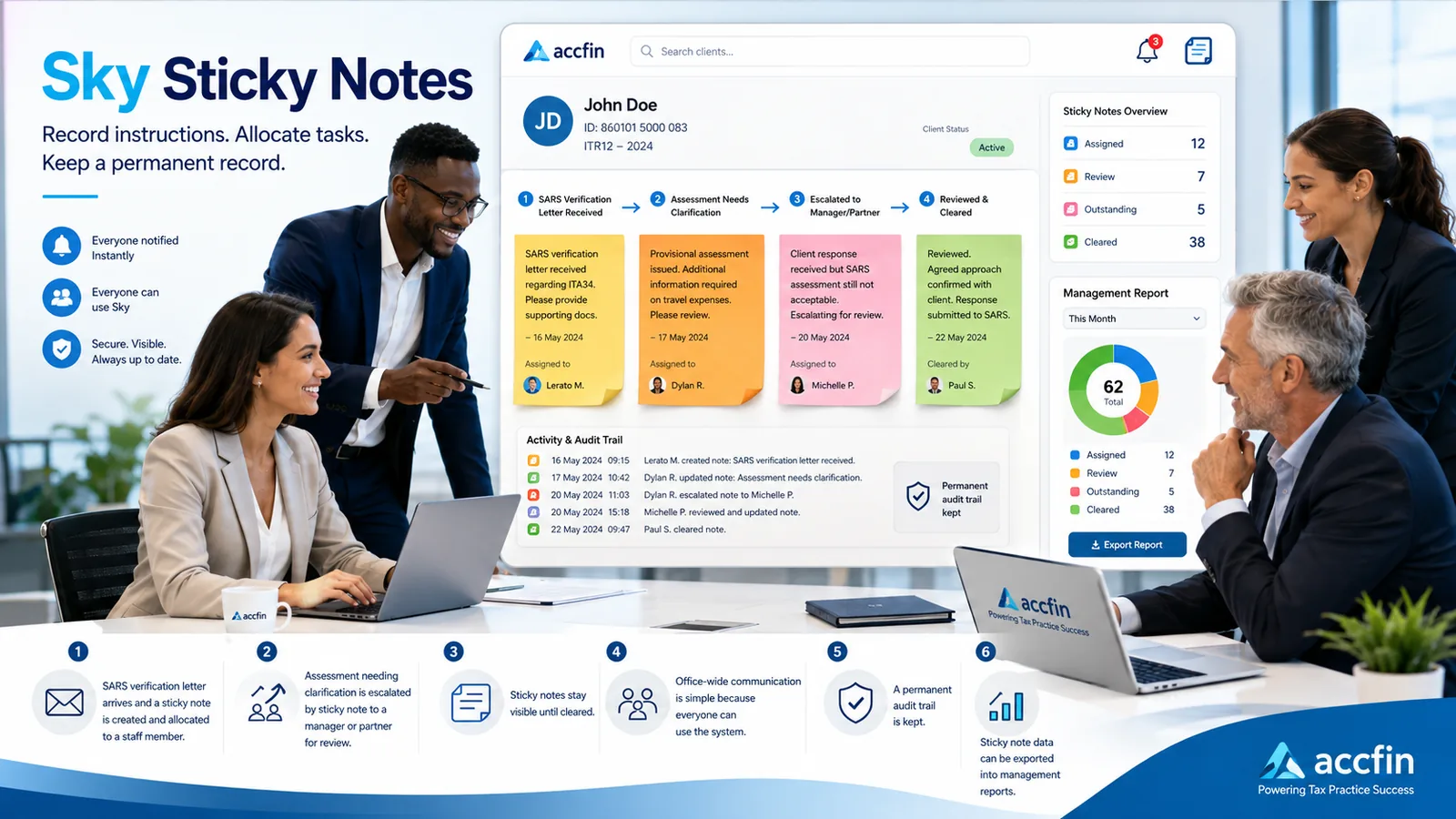
- 1Client information
- 2Return or transaction
- 3SARS information
- 4Documents
- 5Sticky Notes
- 6Review or finalisation status
Modern presentation. Proven one-screen productivity.
The ITR14 production process
From client data to a submitted return, with review built into the path.
- 01
Client and statutory data
The client record already holds the entity details, directors, shareholders and beneficial owners shared across the practice.
- 02
Import the trial balance
Bring in the trial balance and map the accounts to the return once. The mapping is reused in later years.
- 03
Produce the return
The ITR14 is built from the mapped data, with the tax computation produced alongside it.
- 04
Review points
Work through the checks on screen with the supporting figures next to the field being reviewed.
- 05
Sign off and submit
The practitioner approves the return and submits it to SARS from within the workflow.
- 06
Assessment and follow-up
Compare what SARS assessed against what was submitted and pick up the follow-up work from the same client file.
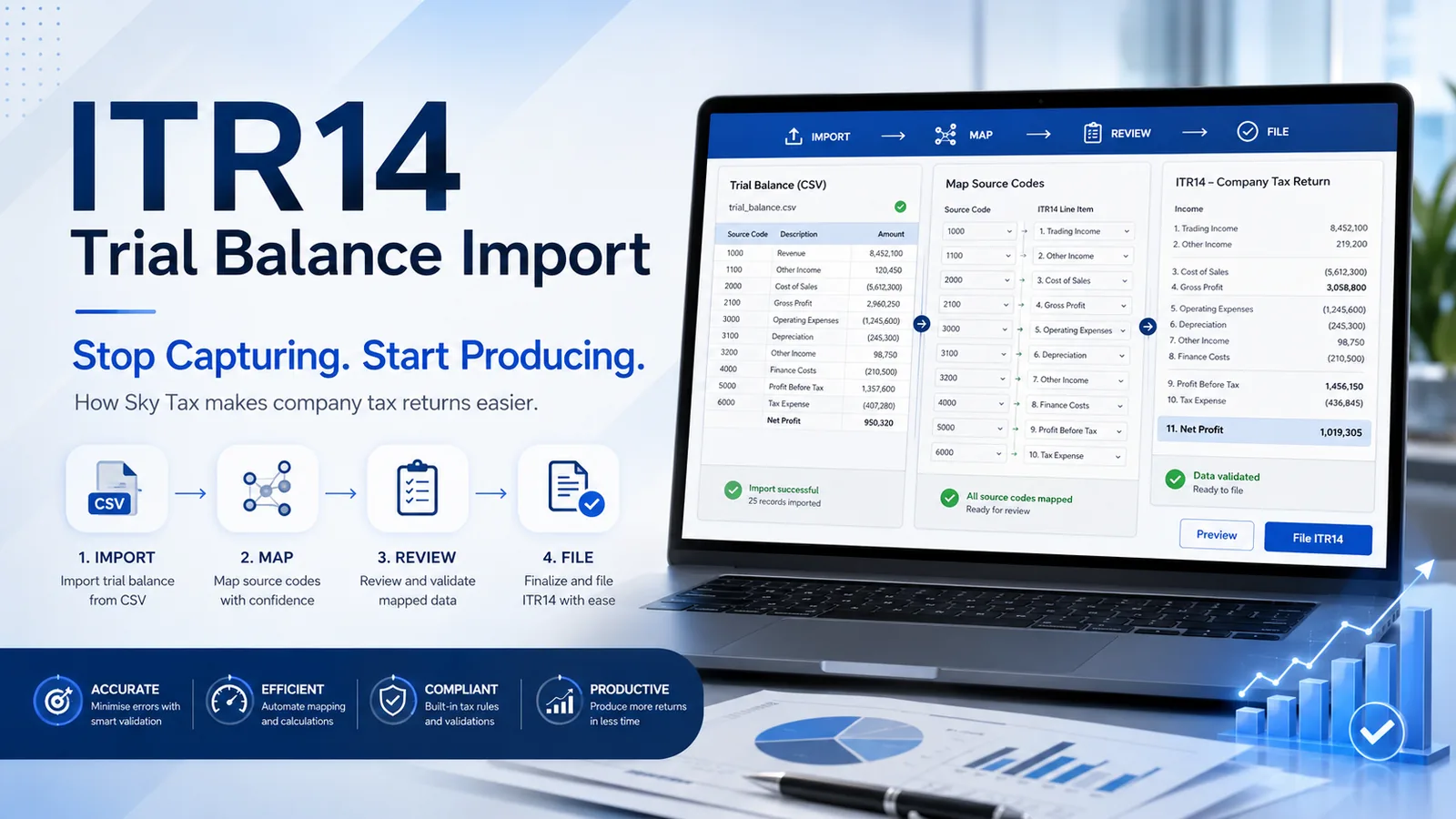
Trial balance import and mapping
- 1Ledger accounts imported from the client's accounting system.
- 2Mapping to the ITR14 disclosure is set once per client.
- 3Balances flow into the return and the tax computation.
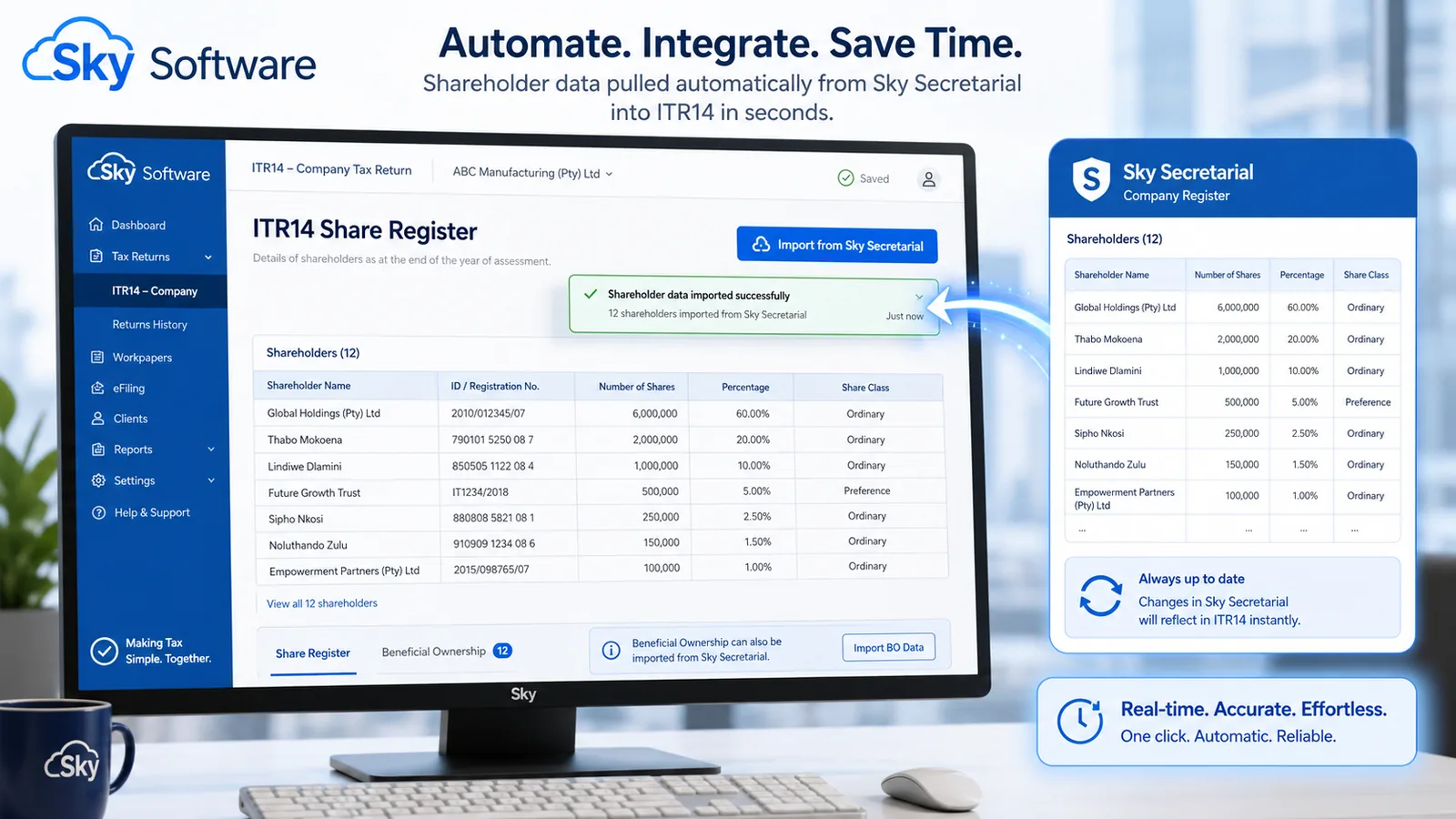
Share register to ITR14 disclosure
- 1Shareholders and beneficial owners come from the client's register.
- 2The same statutory data serves the tax and secretarial work.
- 3Changes are made once and reflected in the return.
Pull shareholders and beneficial owners from Sky Sec directly into the ITR14
The financial information comes from the trial balance. The ownership information comes from Sky Sec. Sky Tax brings both into one controlled ITR14 production process.
The company’s statutory records and tax return no longer need to be two separate capture exercises. From inside the Sky Tax ITR14 screen, the practitioner can pull the company’s shareholders and beneficial owners from Sky Sec, review any differences, accept or reject the proposed information and continue preparing the return without opening a separate application.
Where information must be added or adjusted for the particular ITR14, the practitioner can capture it manually while retaining a clear record of its source.
- Pull shareholders and beneficial owners directly from Sky Sec.
- Review differences before existing ITR14 information is changed.
- Accept or reject individual proposed changes.
- Identify whether information came from Sky Sec or was captured manually.
- Detect percentage, identification-number and missing-link problems.
- Receive a warning if Sky Sec information changes after the ITR14 review.
- Retain an audit trail showing who pulled, reviewed and approved the information.
The practitioner remains responsible for reviewing and confirming the ownership information before the ITR14 is submitted to SARS.
Watch the Sky Tax walkthrough
A walkthrough of the Sky Tax workflow, from client set-up through to SARS submission.
A complete tax-production system, not a filing add-on
Sky Tax runs the tax-production function of a South African accounting practice from one shared client record. It supports individual, trust and company tax returns together with provisional tax, VAT, third-party-data reporting, SARS interactions, supporting documents and staff workflow.
- ITR12, ITR12T, ITR14, IRP6, VAT201, IT3(t) and IT3(d) production
- Direct SARS submission, retrieval and assessment matching
- One-screen working method with documents and history attached
- Sticky Notes for CRM-style workflow, review chains and deadlines
- Shared masters with Sky Sec, Sky FIC and AI Taxman where licensed
- Practice reporting so partners can see the whole tax season
Produce ITR12s efficiently during filing season.
Sky Tax gives the practice a controlled production process for individual tax returns. Available SARS information, taxpayer information, calculations, supporting documents, client communication, submission and assessment follow-up remain connected to the same taxpayer record.
- Pull available pre-populated information from SARS
- IRP5 information
- Medical-scheme information
- Retirement-annuity information
- Travel and other allowable deductions
- Tax calculation
- Client approval
- Batch processing
- Submission to SARS
- Assessment comparison
- Supporting documents
- Sticky Notes for missing information and follow-up
“I single-handedly submitted about 90 ITR12s in the course of two days.”
One practitioner’s reported experience. Actual volumes depend on the firm’s client information, staff and review process.
See the individual-return process
The Sky Academy Sky Tax library includes a recorded ITR12 lesson covering the individual-return workflow from capture through to submission.
See the ITR12 workflowProduce the ITR12T within the wider trust tax workflow.
Prepare and submit the trust's ITR12T while keeping the tax information, supporting documents, SARS correspondence, staff responsibilities and follow-up work together in the trust's client environment.
ITR12T declares the trust’s tax position. IT3(t) reports amounts vested in beneficiaries. Sky Tax helps the practice manage both processes in one connected environment.
- Trust taxpayer information
- Trial-balance import
- Financial information
- Tax calculation
- Beneficiary information
- Distribution and vesting information
- Supporting documents
- SARS submission
- Assessment retrieval
- Sticky Notes and workflow
- Audit trail
- Connection with IT3(t) reporting
More than annual income-tax returns
Prepare provisional-tax calculations and submissions in a repeatable practice workflow.
Manage VAT-return production, supporting information and submission within the client's tax environment.
Prepare, validate and submit trust distribution reporting.
Prepare, validate and submit Section 18A donation reporting.
Module availability depends on the firm’s Accfin licence and configuration.
One platform for the work your tax practice performs every day.
Sky Tax supports the preparation, submission and administration of the principal South African tax-return and third-party-data processes used by accounting firms and tax practitioners.
eFiling is for filing. Sky Tax is for production.
SARS eFiling is the official filing platform. Sky Tax helps the practice prepare, review, control and retain the work before and after submission. This is particularly valuable where firms process substantial volumes and need consistency across multiple staff members.
Trial-balance information
- Working directly on eFiling
- Figures are entered into the return as part of the filing process.
- Producing through Sky Tax
- The trial balance is imported and carried into the return and the tax computation.
Reusable mappings
- Working directly on eFiling
- Preparation happens per return, within the filing session.
- Producing through Sky Tax
- Source-code mappings are stored against the client and reused in later periods.
Staff allocation
- Working directly on eFiling
- Allocation of work is managed by the firm outside the return itself.
- Producing through Sky Tax
- Work is allocated to staff members inside the practice workflow and visible on the client record.
Review and finalisation
- Working directly on eFiling
- The firm applies its own review process before filing.
- Producing through Sky Tax
- Review and finalisation steps are recorded in the system as part of the production workflow.
Supporting documents
- Working directly on eFiling
- Documents are handled according to SARS submission requirements.
- Producing through Sky Tax
- Documents are stored against the client and the period alongside the return.
Client history
- Working directly on eFiling
- History is available for the taxpayer profiles on the filing platform.
- Producing through Sky Tax
- The practice keeps its own history of what was prepared, changed, reviewed and filed.
Assessment follow-up
- Working directly on eFiling
- Assessments and notices are retrieved from the filing platform.
- Producing through Sky Tax
- Assessments are retained on the client file and become follow-up work in the practice.
Practice-wide visibility
- Working directly on eFiling
- Visibility is per taxpayer profile as presented by the platform.
- Producing through Sky Tax
- Reporting across the whole client base shows outstanding, in-progress and completed work.
| Practice requirement | Working directly on eFiling | Producing through Sky Tax |
|---|---|---|
| Trial-balance information | Figures are entered into the return as part of the filing process. | The trial balance is imported and carried into the return and the tax computation. |
| Reusable mappings | Preparation happens per return, within the filing session. | Source-code mappings are stored against the client and reused in later periods. |
| Staff allocation | Allocation of work is managed by the firm outside the return itself. | Work is allocated to staff members inside the practice workflow and visible on the client record. |
| Review and finalisation | The firm applies its own review process before filing. | Review and finalisation steps are recorded in the system as part of the production workflow. |
| Supporting documents | Documents are handled according to SARS submission requirements. | Documents are stored against the client and the period alongside the return. |
| Client history | History is available for the taxpayer profiles on the filing platform. | The practice keeps its own history of what was prepared, changed, reviewed and filed. |
| Assessment follow-up | Assessments and notices are retrieved from the filing platform. | Assessments are retained on the client file and become follow-up work in the practice. |
| Practice-wide visibility | Visibility is per taxpayer profile as presented by the platform. | Reporting across the whole client base shows outstanding, in-progress and completed work. |
SARS eFiling remains the official channel for submission. The distinction drawn here is between official filing and practice-level production control.
Production and SARS administration in the same workflow
Submissions, assessments, letters and notices belong to the client file, so the practice can see the position of each taxpayer without going looking for it.
Submissions and returns
Returns are submitted from within the workflow and recorded against the client with the date and the user.
Assessments
Compare what SARS assessed against what was submitted and pick up differences as follow-up work.
Statements and payments
Keep the taxpayer's account position and payment follow-up next to the return that created it.
Letters and notices
SARS correspondence is filed against the client, so the history of a matter reads in one place.
Turn every SARS event and client instruction into controlled work.
Sky Tax Sticky Notes keep instructions, reminders, responsibilities and follow-ups attached to the relevant client and transaction. Notes can be allocated to other authorised users and followed through to completion.
- 01
A SARS notice or client instruction is received.
- 02
A Sticky Note or workflow item is created.
- 03
The work is allocated to a staff member.
- 04
The responsible user completes the action.
- 05
A manager or partner reviews the result.
- 06
The item is marked complete and retained in the client history.
What a workflow item records
- Client code and name
- Source or work type
- Responsible user
- Partner
- Manager
- Due date
- Status
- Completion date
- Outstanding days
Possible source types
Sticky Notes in context
- 1Notes stay with the client and the transaction.
- 2Each item carries a responsible user, a due date and a status.
Know what must be done
Every SARS event and client instruction becomes a recorded item on the client rather than a message that can be lost.
Know who is responsible
Each item carries the responsible user, with the partner and manager attached to the client.
Know when it is due
Due dates and outstanding days show what is approaching and what is already late.
Know whether it was completed
Status and completion date remain on the client history for review and evidence.
Compliance information is only useful when it leads to an assigned, completed and recorded action.
Capture once. Use the information throughout the practice.
Sky Tax shares client information with other Accfin Sky modules. This reduces duplicate capture and helps the firm maintain consistent statutory, tax and compliance information.
- Sky Sec
- Sky FIC
- AI Taxman
- Documents
- Draftworx
- IT3(t) and IT3(d)
Sky Sec
Pull available company, director, shareholder and beneficial-ownership information into the ITR14 workflow.
Sky FIC
Use shared client and beneficial-owner information in the firm's FICA compliance process.
AI Taxman
Open integrated assistance for SARS letters, assessments and tax questions from the Sky Tax environment.
Documents
Store correspondence, calculations, approvals, submissions and SARS responses against the relevant client or transaction.
Draftworx
Transfer trial-balance information into the Sky Tax ITR14 process, subject to the configured integration.
IT3(t) and IT3(d)
Prepare, validate and submit third-party-data returns within the wider Sky Tax environment.
Module availability depends on the firm's Accfin licence and configuration.
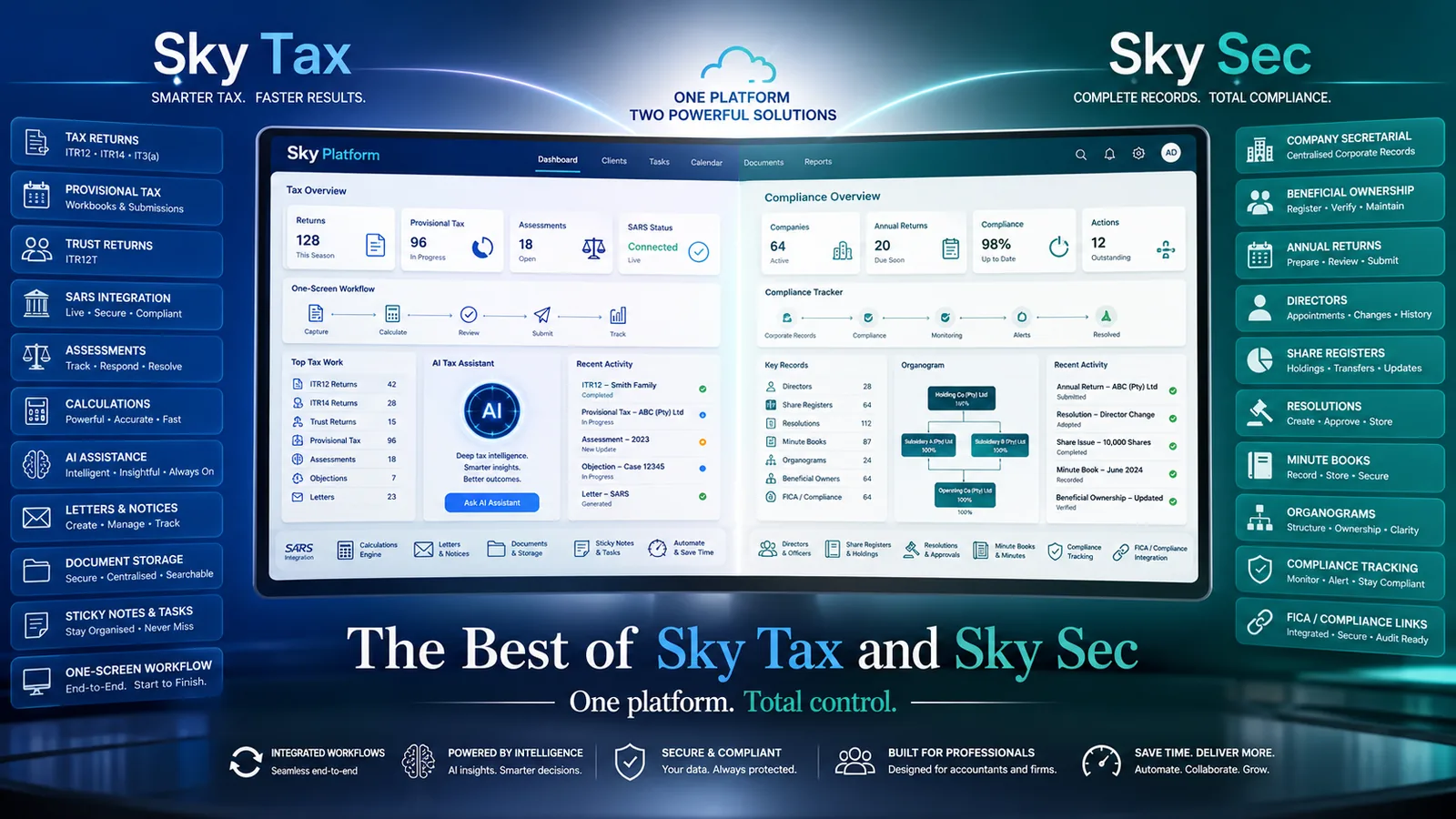
Sky Tax and Sky Sec on one client record
- 1Entity, director and shareholder data captured once.
- 2Secretarial data supports the ITR14 disclosure.
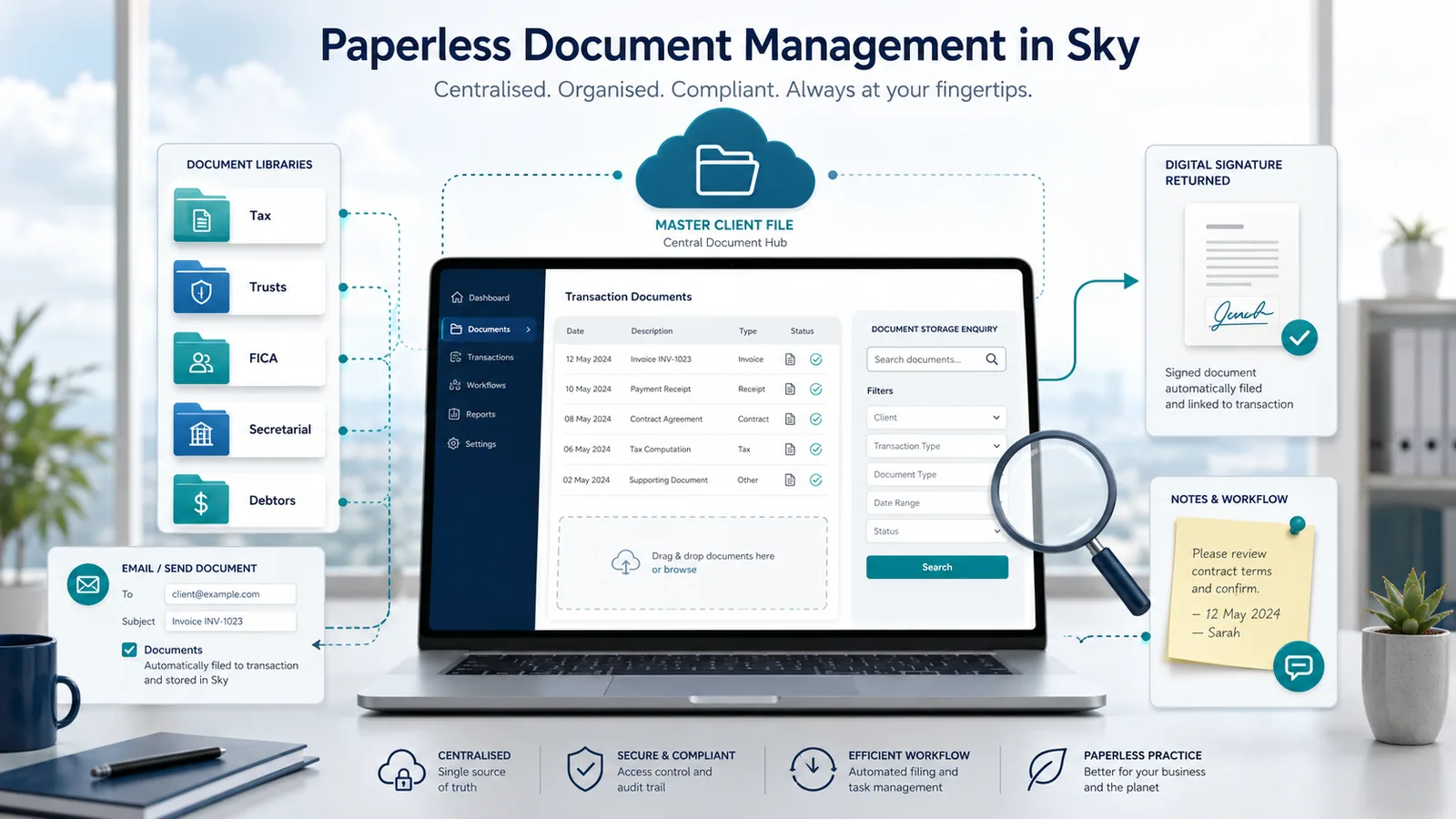
Documents kept with the client
Results reported by South African practices
We publish only approved, verifiable customer quotations. Individual results depend on each practice's data, staff and processes and are not performance promises.
"We save so much time it's ridiculous! We use Draftworx to publish accounts and Sky Tax to file tax returns. The tax return data from Draftworx moves into Sky Tax automatically and we file 40 to 60 ITR14s a day."
"I single-handedly submitted about 90 ITR12s in the course of two days."
These are the reported experiences of individual practices. They are not a guarantee of the volumes or time savings any other firm will achieve.
About Accfin and Sky Tax
Backed by more than 30 years of Accfin practice-software experience. Sky Tax, the current tax production system, was launched in 2014 and has been developed continuously since then in step with SARS requirements.
We help your team change the way it works.
Adoption is a training exercise as much as a software change, so onboarding follows a structured path.
See it
Attend a practical demonstration based on a real tax-production process.
Do it
Complete the first three live returns with implementation support.
Standardise it
Introduce a repeatable process for preparers, managers and partners.
Preparer training
Client set-up, trial-balance import, mapping and completing returns for the people producing the work.
Manager and reviewer training
Review, query handling, finalisation and sign-off across a team's workload.
Partner oversight training
Practice-wide visibility, progress reporting and responsibility for submitted work.
Administrator and workflow training
Users, permissions, Sticky Note allocation and the practice's standard workflow settings.
New staff onboarding
A short repeatable induction so new team members work the same way as everyone else.
Pricing that supports the whole firm
Sky Tax pricing is based primarily on the number of taxpayers rather than the number of individual users. This allows a firm to provide access to all appropriately authorised staff without purchasing a separate licence for every user.
Priced per taxpayer, not per user
- Unlimited authorised users within the practice
- Cost scales with your taxpayer base, not headcount
- Modules quoted according to the firm's requirements
How is a Sky Tax quotation put together?
Indicative pricing and licence terms are confirmed according to the size and requirements of the practice, based on the number of taxpayers on the licence and the modules the firm needs.
Move without losing the history your practice needs
Accfin assists firms with the migration of available client and tax information from supported systems. The scope of the migration is confirmed before implementation.
What does a migration involve?
The migration is scoped with the firm first: what client, taxpayer and history information is available in the current system, what can be brought across, and what is better rebuilt during implementation.
Questions about Sky Tax
What types of tax returns does Sky Tax support?
ITR12 for individuals, ITR12T for trusts, ITR14 for companies, IRP6 provisional returns, VAT201, and the IT3(t) and IT3(d) third-party data returns.
Does Sky Tax submit directly to SARS?
Sky Tax supports submission and the retrieval of SARS information within the tax-production workflow. The practitioner reviews and authorises the work before it is submitted.
Can we prepare ITR14s from a trial balance?
Yes. The trial balance is imported, the SARS source-code mapping is applied or reused, the figures are reviewed and the return is then completed and submitted through the production workflow.
Does Sky Tax integrate with Draftworx?
Trial-balance information can be transferred from Draftworx into the Sky Tax ITR14 process, subject to the configured integration.
Can shareholder and beneficial-ownership information flow from Sky Sec?
Yes. From inside the Sky Tax ITR14 screen, the practitioner can pull the company's shareholders and beneficial owners from Sky Sec, review differences and accept or reject the proposed information before continuing with the return. Information can also be captured or adjusted manually where necessary, with its source retained in the audit trail.
How do Sticky Notes assist with workflow?
Sticky Notes keep instructions, reminders, responsibilities and follow-ups attached to the relevant client and transaction. A note can be allocated to another authorised user, actioned, reviewed and marked complete.
Can managers see outstanding work across the practice?
Yes. Allocated work and its status can be viewed across clients and staff, so managers can see what is outstanding, who is responsible and what has been completed.
Is Sky Tax suitable for a smaller accounting practice?
Yes. Because pricing is based primarily on taxpayer numbers, smaller practices can use the same production workflow as larger firms and scale as their client base grows.
Are users charged individually?
No. Pricing is based primarily on the number of taxpayers rather than the number of individual users, so appropriately authorised staff can be given access without a separate licence per user.
Can we migrate from another tax system?
Accfin assists firms with the migration of available client and tax information from supported systems. The scope of the migration is confirmed before implementation.
What training is provided?
Onboarding follows a see it, do it, standardise it path, with role-based training for preparers, managers and reviewers, partners, administrators and new staff.
How does AI Taxman integrate with Sky Tax?
AI Taxman provides integrated assistance for SARS letters, assessments and tax questions from within the Sky Tax environment, subject to licence and configuration. Output is assistance only and remains subject to professional review.
Are IT3(t) and IT3(d) included?
IT3(t) and IT3(d) third-party-data returns are prepared, validated and submitted within the wider Sky Tax environment. Availability depends on the firm's Accfin licence and configuration.
How are SARS and legislative changes handled?
Sky Tax has been developed continuously since 2014 in step with SARS requirements, and updates are released as SARS forms, validations and legislation change.
Tell us where your practice is today
Whether you want a demonstration, ITR14 training or help getting more out of Sky Tax, this tells us how to help.
Stop capturing the ITR14. Start producing it.
See the workflow on your own company files. Book a demonstration, watch the walkthrough, or bring three returns to a working session with our team.
